> ## Documentation Index
> Fetch the complete documentation index at: https://support.effra.io/llms.txt
> Use this file to discover all available pages before exploring further.
# Mindbody
# Setting up Mindbody
To get Mindbody set up there are three steps:
1. [Create a new staff user for Effra](#create-a-new-staff-user-for-effra)
2. [Connect your site to Effra](#connect-your-site-to-effra)
3. [Create payment methods](#create-payment-methods)
## Create a new staff user for Effra
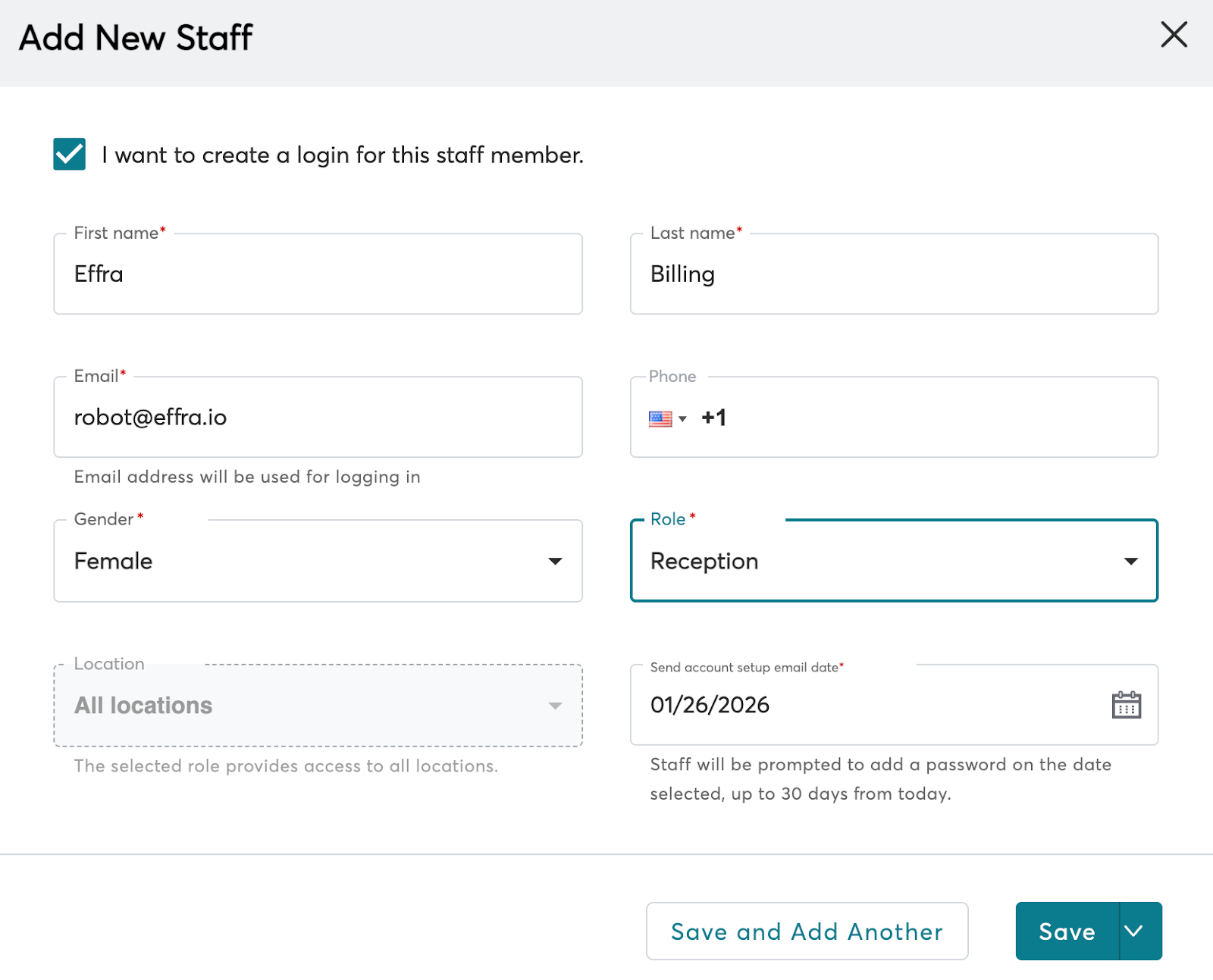
1. From the left sidebar menu click **Staff** or follow this [link](https://clients.mindbodyonline.com/app/staff)
2. Create a new staff user for Effra
3. Tick *I want to create a login for this staff member*
4. Enter a **First name** and **Last name** that will be clear for future reference for example **Effra** and **Ltd**
5. Enter [**robot@effra.io**](mailto:robot@effra.io) in the **Email** field
6. Select **Reception** as the role
7. Select **All locations**
8. Set the **Send account setup email date** to today's date
9. Click **Save**
 ## Connect your site to Effra
1. Share your Mindbody Site ID with Effra. You can find your Site ID in the page footer when you are logged in to Mindbody.
2. When you receive the activation email from Mindbody, click the link to activate your site
3. Let Effra know when you have completed the activation process
## Create payment methods
1. Go to Settings -> Retail -> Payment Methods or follow this [link](https://clients.mindbodyonline.com/asp/adm/adm_tlbx_paymeth.asp)
2. Add the following payment methods with all checkboxes selected:
* `Effra insurance payment`
* `Effra patient payment`
## Connect your site to Effra
1. Share your Mindbody Site ID with Effra. You can find your Site ID in the page footer when you are logged in to Mindbody.
2. When you receive the activation email from Mindbody, click the link to activate your site
3. Let Effra know when you have completed the activation process
## Create payment methods
1. Go to Settings -> Retail -> Payment Methods or follow this [link](https://clients.mindbodyonline.com/asp/adm/adm_tlbx_paymeth.asp)
2. Add the following payment methods with all checkboxes selected:
* `Effra insurance payment`
* `Effra patient payment`
